

JavaScript
Parcel includes first-class support for JavaScript, including ES modules and CommonJS, many types of dependencies, automatic transpilation for browser targets, JSX and TypeScript support, and much more.
Modules
#Modules allow you to break up your code into different files, and share functionality between them by importing and exporting values. This can help you structure your code into independent parts, with well-defined interfaces for communicating between them.
Parcel includes support for both ES modules and CommonJS syntax. Module specifiers are resolved as described in Dependency resolution.
ES modules
#ES module syntax is the standard way to import and export values between files in JavaScript. It should be preferred over CommonJS for new code. The import statement can be used to reference a value exposed by the export statement in another file.
This example imports a multiply function from math.js, and uses it to implement a square function.
import { multiply } from "./math.js";

export function square(x) {
  return multiply(x, x);
}export function multiply(a, b) {
return a * b;
}To learn more about ES modules, see the documentation on MDN.
CommonJS
#CommonJS is a legacy module system supported in Node, and widely used by libraries on npm. If you’re writing new code, you should generally prefer ES module syntax as described above. CommonJS provides a require function, which can be used to access the exports object exposed by another file.
This example uses require to load the math.js module, and uses the multiply function on its exports object to implement a square function.
let math = require("./math");

exports.square = function (x) {
  return math.multiply(x, x);
};exports.multiply = function (a, b) {
return a * b;
};In addition to require and exports, Parcel also supports module.exports, as well as the __dirname and __filename module globals, and process.env for access to environment variables. See the Node emulation docs for more details.
To learn more about CommonJS, see the Node.js docs.
Dynamic import
#Both the ES module import statement and CommonJS require function load dependencies synchronously: that is, the module can be referenced immediately without waiting for a network request. Typically, modules that are imported synchronously are bundled together into the same file as their parent, or referenced in another bundle that is already loaded.
The dynamic import() function can be used to load dependencies asynchronously. This allows loading code lazily, on demand, and is a good technique for reducing the file size of the initial page load of your app. import() returns a Promise, which notifies you when the dependency has been loaded.
import("./pages/about").then(function (page) {
  page.render();
});
See the code splitting docs for more details on how to use dynamic imports.
Top-level await
#Top-level await can be used in ES modules to wait for a Promise before the module finishes evaluating, e.g. to load data or initialize a WebAssembly module. Modules that import an async module, directly or indirectly, wait for it to finish before they run.
let res = await fetch("/config.json");
export const config = await res.json();
Since require is synchronous, a module that uses top-level await (or imports a module that does) cannot be loaded with require. Use import or dynamic import() instead. When building a library, top-level await is only supported with ES module output.
Import attributes
#Import attributes can be used to change how a dependency is imported. Parcel supports the following values for the type attribute:
json– imports a JSON file as a JavaScript object. This is the same as an import without an attribute.css– imports a CSS file as aCSSStyleSheetobject, which can be used withdocument.adoptedStyleSheetsor in a shadow root.text– imports the compiled contents of a file as a string.bytes– imports the compiled contents of a file as aUint8Array.url– imports a URL to the file, which is processed and copied into the dist directory like a URL dependency.
import data from './data.json' with {type: 'json'};
import sheet from './style.css' with {type: 'css'};
import text from './data.json' with {type: 'text'};
import bytes from './image.png' with {type: 'bytes'};
import url from './data.json' with {type: 'url'};
Classic scripts
#One of the benefits of modules (both ES modules and CommonJS) is that they isolate functionality. This means that variables declared in the top-level scope cannot be accessed outside the module unless they are exported. This is generally a great characteristic, but modules in JavaScript are relatively recent and there are many legacy libraries and scripts that do not expect to be isolated.
A classic script, is a JavaScript file that is loaded via the traditional <script> tag in HTML (without type="module") or other means such as Workers. Classic scripts treat variables in the top-level scope as globals which can be accessed even between different scripts.
For example, when loading a library like jQuery, a $ variable is available globally to other scripts on the page. If jQuery were loaded as a module, $ would not be accessible unless it were assigned as a property to the window object manually.
<script src="jquery.js"></script>
<script>
  // The $ variable is now available globally.
  $(".banner").show();
</script>
In addition, classic scripts do not support synchronous imports or exports via either ES modules or CommonJS, and Node emulation is disabled. However, dynamic import() is supported to load a module from within a classic script.
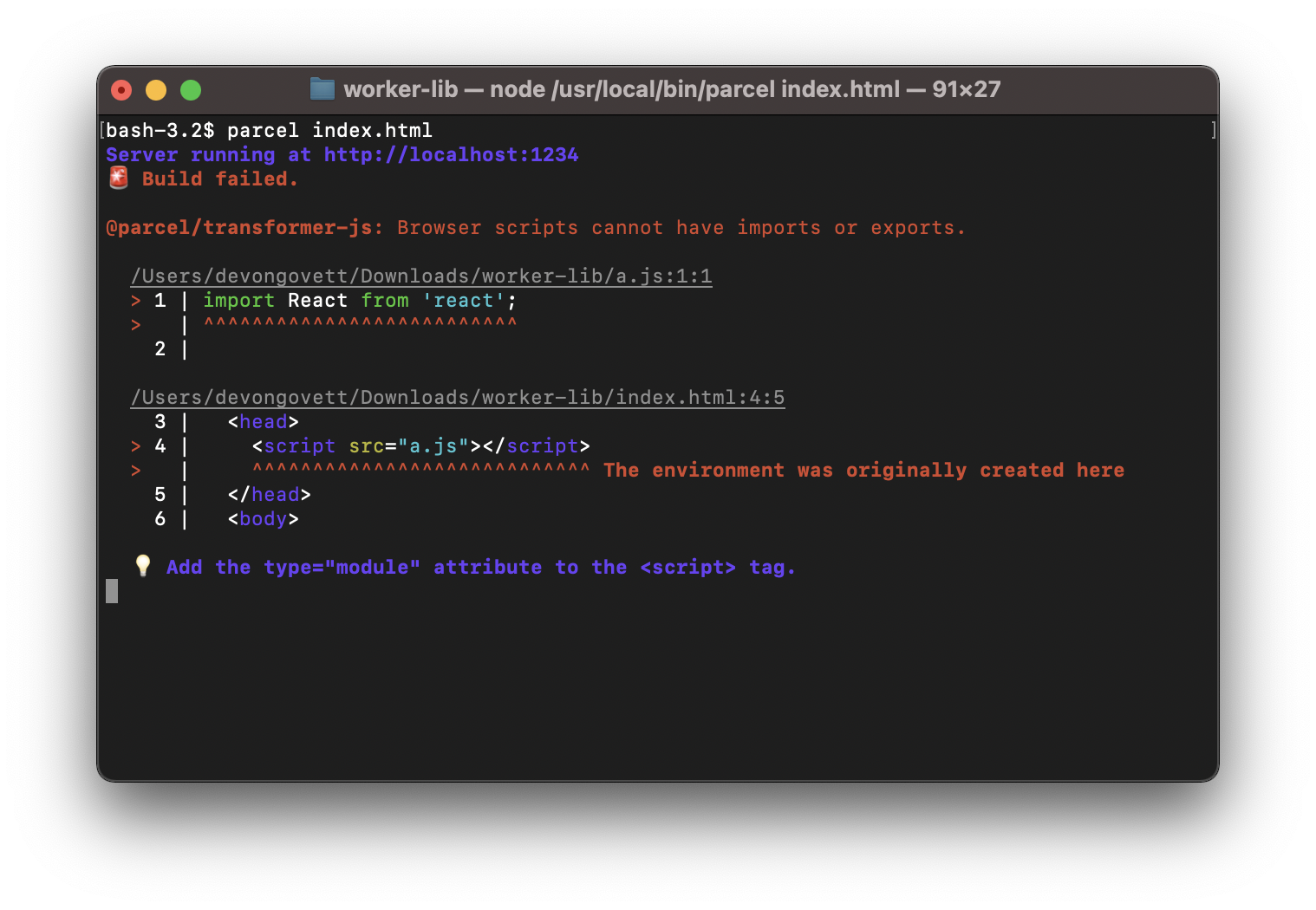
Parcel matches browser behavior for classic scripts and modules. If you wish to use imports or exports within your code, you’ll need to use <script type="module"> to reference your JavaScript from an HTML file. For workers, use the {type: 'module'} option (see below). If this is missing, you'll see a diagnostic like the one below.
import.meta
#The import.meta object includes information about the module it is referenced in. Parcel currently supports a single property, import.meta.url, which includes a file:// url for the module on the file system. This URL is relative to your project root (e.g. the directory where Git is initialized) to avoid exposing any build system details.
console.log(import.meta);
// => {url: 'file:///src/App.js'}

console.log(import.meta.url);
// => 'file:///src/App.js'
URL dependencies
#You can reference non-JavaScript assets such as images or videos from a JavaScript file using the URL constructor. These are resolved relative to the module by using import.meta.url as the base URL parameter. The first argument must be a string literal to be recognized (not a variable or expression).
This example references an image named hero.jpg in the same directory as the JavaScript file, and creates an <img> element from it.
let img = document.createElement('img');
img.src = new URL('hero.jpg', import.meta.url);
document.body.appendChild(img);
Parcel will process any files referenced by a URL dependency as it does any other dependency. For example, images will be processed by the image transformer, and you can use query parameters to specify options to resize and convert them. If no transformers are configured for a particular file type, then the file will be copied into the dist directory unmodified. The resulting file names will also include a content hash for long term cacheability in the browser.
Workers
#Parcel has built in support for web workers, service workers, and worklets, which allow moving work to a different thread.
Web workers
#Web workers are the most general type of worker. They allow you to run arbitrary CPU-heavy work in a background thread to avoid blocking the user interface. Workers are created using the Worker constructor, and referencing another JavaScript file using the URL constructor as described above.
To use ES module or CommonJS syntax in a worker, use the type: 'module' option as described in Classic scripts above. Parcel will compile your worker to a non-module worker if necessary, depending on your targets and current browser support.
new Worker(new URL("worker.js", import.meta.url), { type: "module" });Parcel also supports the SharedWorker constructor, which creates a worker that can be accessed in different browser windows or iframes. It supports the same options as described above for Worker.
To learn more about web workers, see the docs on MDN.
Service workers
#Service workers run in the background and provide features like offline caching, background sync, and push notifications. They are created using the navigator.serviceWorker.register function, and using the URL constructor to reference another JavaScript file.
To use ES module or CommonJS syntax in a service worker, use the type: 'module' option as described in Classic scripts above. Parcel will compile your service worker to a non-module worker if necessary, depending on your targets and current browser support.
navigator.serviceWorker.register(
  new URL("service-worker.js", import.meta.url),
  { type: "module" }
);Note: dynamic import() is not supported in service workers.
To learn more about service workers, see the docs on MDN, and the Offline Cookbook on web.dev.
Classic script workers
#The type: 'module' option may also be omitted to treat workers and service workers as classic scripts instead of modules. The importScripts function can be used to load additional code in classic script workers, however, the code will loaded at runtime and will not be processed by Parcel. This is because importScripts resolves URLs relative to the page, not the worker script. Therefore, the parameter to importScripts must be a fully-qualified absolute URL, not a relative path.
The following examples show patterns that are supported and unsupported.
// ✅ absolute URL
importScripts("http://some-cdn.com/worker.js");

// ✅ computed URL
importScripts(location.origin + "/worker.js");

// 🚫 relative path
importScripts("worker.js");

// 🚫 absolute path
importScripts("/worker.js");
Worklets
#Parcel also supports worklets, including CSS Houdini paint worklets. These let you hook into low level aspects of the rendering process in the browser.
Paint worklets are detected automatically using the following syntax:
CSS.paintWorklet.addModule(new URL("worklet.js", import.meta.url));Web audio worklets are not statically analyzable, so for these you can import a URL to the worklet file using the url import attribute. The env: 'worklet' attribute compiles it for the correct environment.
import workletUrl from './worklet.js' with {type: 'url', env: 'worklet'};

context.audioWorklet.addModule(workletUrl);
Worklets are always modules – there are no classic script worklets. This means the type: 'module' option is not required for worklets, and importScripts is not supported.
In addition, dynamic import() is not supported in worklets.
Transpilation
#Parcel includes support for transpiling JSX and TypeScript out of the box, as well as transpiling modern JavaScript syntax to support older browsers. In addition, Babel is supported via a plugin to enable experimental or custom JavaScript transformations.
JSX
#Parcel supports JSX out of the box. JSX is automatically enabled in a .jsx or .tsx file, or when one of the following libraries is defined as a dependency in your package.json:
reactpreactnervjshyperapp
The correct JSX pragma is also automatically inferred based on the library you use. Parcel also automatically detects the version of React or Preact that is installed, and enables the modern JSX transform if supported.
JSX compilation can also be configured using a tsconfig.json or jsconfig.json file. This allows overriding the runtime, pragma, and other options. See the TSConfig reference for more information.
{
  "compilerOptions": {
    "jsx": "react-jsx",
    "jsxImportSource": "preact"
  }
}
React Compiler
#React Compiler automatically memoizes your React components and hooks. It can be enabled using the reactCompiler option of @parcel/transformer-js in your .parcelrc. React Compiler runs on JavaScript and TypeScript files in your project, but not on files in node_modules.
{
  "extends": "@parcel/config-default",
  "transformers": {
    "*.{js,jsx,ts,tsx}": [
      {
        "plugin": "@parcel/transformer-js",
        "config": {
          "reactCompiler": true
        }
      }
    ]
  }
}
Instead of true, reactCompiler can also be set to an object with the following options. See the React Compiler docs for details.
compilationMode– Which functions to compile:"infer"(default),"annotation", or"all".panicThreshold– Which compiler errors should fail the build:"none"(default),"critical_errors", or"all_errors".target– The React version to compile for:"17","18", or"19".gating– Wraps compiled functions in a runtime feature flag check.
By default, React Compiler targets React 19. If the version of react listed in your package.json is 17 or 18, Parcel targets that version instead. In this case, you'll also need to install the react-compiler-runtime package.
Flow
#Flow types are not stripped by Parcel's builtin transpiler. To use Flow, add @parcel/transformer-babel to your .parcelrc and use @babel/preset-flow in your Babel config. See Babel for more details.
TypeScript
#See TypeScript.
Browser compatibility
#By default Parcel does not perform any transpilation of JavaScript syntax for older browsers. This means that if you write your code using modern language features, that’s what Parcel will output. You can declare your app’s supported browsers using the browserslist field in your package.json. When this field is declared, Parcel will transpile your code accordingly to ensure compatibility with your supported browsers.
{
  "browserslist": "> 0.5%, last 2 versions, not dead"
}
See the Targets docs for more details on how to configure this.
When transpiling, Parcel may insert imports of helper functions from the @swc/helpers package (e.g. for classes or async functions when targeting older browsers, or for decorators). If your code needs these helpers, you'll need to install @swc/helpers as a dependency of your project.
yarn add @swc/helpersBy default, Parcel supports all standard JavaScript features, as well as proposals that have shipped in one or more browsers. You can also enable support for future proposals using a tsconfig.json or jsconfig.json file. Currently, the only supported proposal is decorators, which you may be using through TypeScript.
{
  "compilerOptions": {
    "experimentalDecorators": true
  }
}
More experimental features can be enabled using Babel.
Babel
#Babel is a popular transpiler for JavaScript, with a large plugin ecosystem. Babel is supported in Parcel via the @parcel/transformer-babel plugin. It is not included in the default config, so you'll need to install it and add it to your .parcelrc before Parcel's builtin JavaScript transformer.
yarn add @parcel/transformer-babel@next --dev{
"extends": "@parcel/config-default",
"transformers": {
"*.{js,mjs,jsx,ts,tsx}": ["@parcel/transformer-babel", "..."]
}
}Using Babel with Parcel then works the same way as using it standalone or with other build tools. Create a Babel config file such as .babelrc and Parcel will pick it up automatically. If no Babel config file is found, the file is not processed by Babel.
Parcel supports both project wide config files such as babel.config.json, as well as file relative configs such as .babelrc. See the Babel docs for details on configuration for more details. Babel config files only apply to your own source code, not to files in node_modules.
Alternatively, Babel options can be specified in your .parcelrc. In this case, Babel config files are ignored, and the options apply to all files matched by the glob, including files in node_modules.
{
  "extends": "@parcel/config-default",
  "transformers": {
    "*.{js,mjs,jsx,ts,tsx}": [
      {
        "plugin": "@parcel/transformer-babel",
        "config": {
          "plugins": ["@emotion/babel-plugin"]
        }
      },
      "..."
    ]
  }
}
Default presets
#Parcel includes transpilation for browser targets (equivalent to @babel/preset-env), JSX (equivalent to @babel/preset-react), and TypeScript (equivalent to @babel/preset-typescript) by default. If these are the only transforms you need in your project, then you may not need Babel at all.
If you have an existing project with a Babel config containing only the above presets, you may be able to remove it. This can significantly improve build performance since Parcel’s builtin transpiler is much faster than Babel.
Custom plugins
#If you have custom Babel presets or plugins beyond the ones listed above, you can configure Babel to only include these custom plugins and omit the standard presets. This will improve build performance by allowing Babel to do less work and letting Parcel handle the default transformations.
{
  "plugins": ["@emotion/babel-plugin"]
}
Babel runs before Parcel's builtin transpiler, so it still needs to be able to parse any JSX or TypeScript syntax in your code. If you omit the standard presets, add the corresponding syntax plugins (e.g. @babel/plugin-syntax-jsx or @babel/plugin-syntax-typescript) to your Babel config.
If you use Flow, you'll need to keep @babel/preset-flow in your Babel config along with any custom plugins, since Parcel's builtin transpiler does not strip Flow types. Other Babel presets listed above can be removed.
@babel/preset-env and @babel/plugin-transform-runtime are not aware of Parcel's Targets. This will likely result in unnecessary transpilation and larger bundle sizes. These are not necessary, since transpilation for your browser targets is handled automatically by Parcel.
Usage with other tools
#While Parcel includes transpilation by default, you may still need to use Babel with other tools such as test runners like Jest, and linters like ESLint. If this is the case, you may not be able to completely remove your Babel config. Since @parcel/transformer-babel is not included in the default config, Parcel ignores your Babel config unless you add the plugin to your .parcelrc. This allows other tools to continue using your Babel config without affecting Parcel's build performance.
Production
#In production mode, Parcel includes optimizations to reduce the file size of your code. See Production for more details about how this works.
Minification
#In production mode, Parcel automatically minifies your code to reduce the file sizes of your bundles. Parcel uses SWC to perform minification.
Tree shaking
#In production builds, Parcel statically analyzes the imports and exports of each module, and removes everything that isn't used. This is called "tree shaking" or "dead code elimination". Tree shaking is supported for both static and dynamic import(), CommonJS and ES modules, and even across languages with CSS modules.