

CSS
Parcel includes support for CSS out of the box. To add a CSS file, either reference it with a <link> tag in an HTML file:
<link rel="stylesheet" href="index.css" />or import it from a JavaScript file:
import "./index.css";Dependencies
#CSS assets can contain dependencies referenced by @import syntax, as well as references to images, fonts, etc. via the url() function.
@import
#The @import at-rule can be used to inline another CSS file into the same CSS bundle as the containing file. This means that at runtime a separate network request will not be needed to load the dependency.
@import "other.css";Referenced files should be relative to the containing CSS file. You can also use absolute and tilde specifiers. To import a CSS file from npm, use the npm: scheme.
@import "npm:bootstrap/bootstrap.css";When the @parcel/resolver-glob plugin is enabled, you can also use globs to import multiple CSS files at once. See Glob specifiers for more details.
@import "./components/*.css";@import rules may also include cascade layer, supports(), and media query conditions. Parcel wraps the inlined rules in the corresponding @layer, @supports, and @media blocks.
@import "theme.css" layer(base) supports(display: grid) (min-width: 500px);Cascade order
#Since the order in which stylesheets are applied affects the CSS cascade, Parcel preserves the order of your @import rules and CSS imports from JavaScript, even when CSS is split across multiple bundles (e.g. via code splitting). If different entries or bundles import the same stylesheets in conflicting orders, Parcel duplicates those stylesheets so that each one is applied in the correct order, and emits a warning. Import stylesheets in a consistent order to allow them to be shared.
url()
#The url() function can be used to reference a file, for example a background image or font. The referenced file will be processed by Parcel, and the URL reference will be rewritten to point to the output filename.
body {
  background: url(images/background.png);
}
Referenced files should be relative to the containing CSS file. You can also use absolute and tilde specifiers. The data-url: scheme can also be used to inline a file as a data URL. See Bundle inlining for more details.
.logo {
  background: url("data-url:./logo.png");
}Note: Only absolute paths may be used within CSS custom properties, not relative paths. This is because url() references in custom properties are resolved from the location where the var() is used, not where the custom property is defined. This means that the custom property could resolve to different URLs depending on which file it is used in. To resolve this ambiguity, use absolute paths when referencing URLs in custom properties.
body {
  /* ❌ relative paths are not allowed in custom properties. */
  --logo: url(images/logo.png);
  /* ✅ use absolute paths instead. */
  --logo: url(/src/images/logo.png);
}.logo {
background: var(--logo);
}In the above example, the relative path images/logo.png would resolve to /src/home/images/logo.png rather than /src/images/logo.png as you might expect, because it is referenced in /src/home/header.css. The absolute path /src/images/logo.png resolves consistently no matter which file var(--logo) is used in.
CSS modules
#By default, CSS imported from JavaScript is global. If two CSS files define the same class names, ids, custom properties, @keyframes, etc., they will potentially clash and overwrite each other. To solve this, Parcel supports CSS modules.
CSS modules treat the classes defined in each file as unique. Each class name or identifier is renamed to include a unique hash, and a mapping is exported to JavaScript to allow referencing them.
To use CSS modules, create a file with the .module.css extension, and import it from a JavaScript file with a namespace import. Then, you can access each of the classes defined in the CSS file as an export from the module.
import * as classes from "./styles.module.css";

document.body.className = classes.body;
.body {
background: skyblue;
}The .body class will be renamed to something unique to avoid selector clashes with other CSS files.
CSS modules also work with other languages that compile to CSS, such as SASS, Less, or Stylus. Name your file using the corresponding file extension, such as .module.scss, .module.less, or .module.styl.
Tree shaking
#Using CSS modules also has the benefit of making dependencies on specific class names explicit in your code. This enables unused CSS classes to be automatically removed.
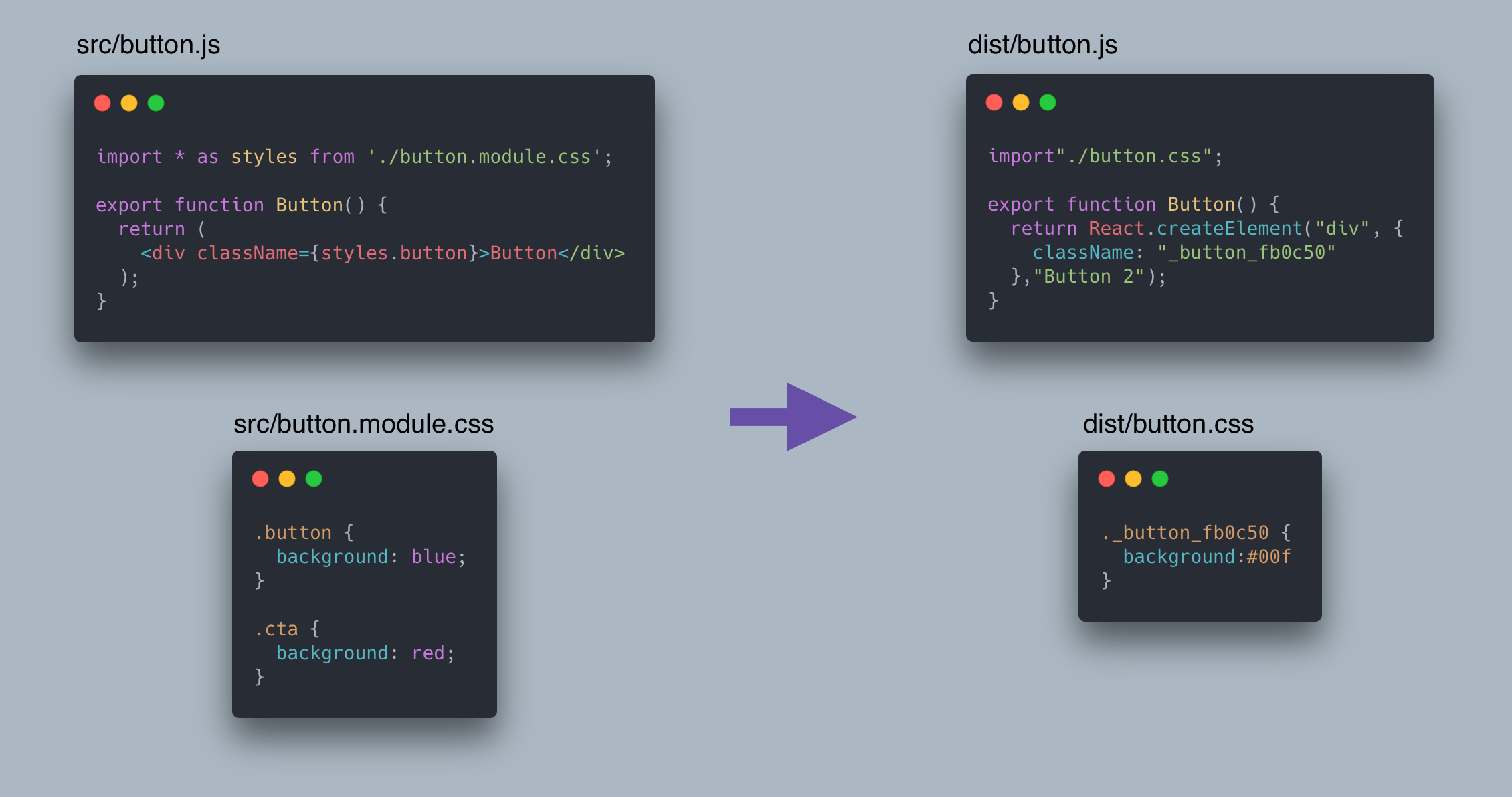
As you can see in the above example, only the .button class is used, so the unused .cta class is removed from the compiled CSS file.
This also works with other unused CSS rules such as @keyframes and @counter-style, as well as CSS custom properties (when the dashedIdents option is enabled).
Note: Tree shaking only works when you reference classes using either a namespace or named import, or a require call. Tree shaking does not work with default imports. When using a namespace import or require, classes must be accessed using static property accesses (e.g. styles.button) rather than dynamic ones (e.g. styles[name]).
import styles from "./styles.module.css";should be replaced with:
import * as styles from "./styles.module.css";Local CSS variables
#By default, class names, id selectors, and the names of @keyframes, @counter-style, and CSS grid lines and areas are scoped to the module they are defined in. Scoping for CSS variables and other <dashed-ident> names can also be enabled using the dashedIdents option. This is configured for @parcel/transformer-css in your .parcelrc.
{
  "extends": "@parcel/config-default",
  "transformers": {
    "*.module.css": [
      {
        "plugin": "@parcel/transformer-css",
        "config": {
          "cssModules": {
            "dashedIdents": true
          }
        }
      }
    ]
  }
}
When enabled, CSS variables will be renamed so they don't conflict with variable names defined in other files. Referencing a variable uses the standard var() syntax, which Parcel will update to match the locally scoped variable name.
You can also reference variables defined in other files using the from keyword:
.button {
  background: var(--accent-color from "./vars.module.css");
}:root {
--accent-color: hotpink;
}Global variables may be referenced using the from global syntax, however, they currently must be defined in a non-CSS module file.
@import "vars.css";

.button {
  color: var(--color from global);
}:root {
--color: purple;
}The same syntax also applies to other CSS values that use the <dashed-ident> syntax. For example, the @font-palette-values rule and font-palette property use the <dashed-ident> syntax to define and refer to custom font color palettes, and will be scoped and referenced the same way as CSS variables.
Custom naming patterns
#By default, Parcel prepends the hash of the filename to each class name and identifier in a CSS file. You can configure this naming pattern using the "pattern" option in your .parcelrc. This accepts a string with placeholders that will be filled in by Parcel, allowing you to add custom prefixes or adjust the naming convention for scoped classes.
{
  "extends": "@parcel/config-default",
  "transformers": {
    "*.module.css": [
      {
        "plugin": "@parcel/transformer-css",
        "config": {
          "cssModules": {
            "pattern": "my-company-[name]-[hash]-[local]"
          }
        }
      }
    ]
  }
}
The following placeholders are currently supported:
[name]- The base name of the file, without the extension.[hash]- A hash of the full file path.[content-hash]- A hash of the file contents.[local]- The original class name or identifier.
Note: CSS grid line names can be ambiguous due to automatic postfixing done by the browser, which generates line names ending with -start and -end for each grid template area. When using CSS grid, your "pattern" configuration must end with the [local] placeholder so that these references work correctly.
.grid {
  grid-template-areas: "nav main";
}

.nav {
  grid-column-start: nav-start;
}{
"extends": "@parcel/config-default",
"transformers": {
"*.module.css": [
{
"plugin": "@parcel/transformer-css",
"config": {
"cssModules": {
// ❌ [local] must be at the end so that
// auto-generated grid line names work
"pattern": "[local]-[hash]"
// ✅ do this instead
"pattern": "[hash]-[local]"
}
}
}
]
}
}Enabling CSS modules globally
#By default, CSS modules are only enabled for files whose name ends with .module.css. All other CSS files are treated as global CSS by default. However, this can be overridden to enable CSS modules for other files by configuring @parcel/transformer-css in your .parcelrc. For example, this enables CSS modules for all CSS files in your src directory (but not in node_modules):
{
  "extends": "@parcel/config-default",
  "transformers": {
    "src/**/*.css": [
      {
        "plugin": "@parcel/transformer-css",
        "config": {
          "cssModules": true
        }
      }
    ]
  }
}
When using a configuration object with other options such as "pattern" or "dashedIdents", CSS modules are also enabled for the matching files.
Transpilation
#Parcel includes support for transpiling modern CSS syntax to support older browsers out of the box, including vendor prefixing and syntax lowering. In addition, PostCSS is supported to enable custom CSS transformations.
Browser targets
#By default Parcel does not perform any transpilation of CSS syntax for older browsers. This means that if you write your code using modern syntax or without vendor prefixes, that’s what Parcel will output. You can declare your app’s supported browsers using the browserslist field in your package.json. When this field is declared, Parcel will transpile your code accordingly to ensure compatibility with your supported browsers.
{
  "browserslist": "> 0.5%, last 2 versions, not dead"
}
See the Targets docs for more details on how to configure this.
Vendor prefixing
#Based on your configured browser targets, Parcel automatically adds vendor prefixed fallbacks for many CSS features. For example, when using the image-set() function, Parcel will output a fallback -webkit-image-set() value as well, since Chrome does not yet support the unprefixed value.
.logo {
  background: image-set(url(logo.png) 2x, url(logo.png) 1x);
}
compiles to:
.logo {
  background: -webkit-image-set(url(logo.png) 2x, url(logo.png) 1x);
  background: image-set("logo.png" 2x, "logo.png");
}
In addition, if your CSS source code (or more likely a library) includes unnecessary vendor prefixes, Parcel CSS will automatically remove them to reduce bundle sizes. For example, when compiling for modern browsers, prefixed versions of the transition property will be removed, since the unprefixed version is supported by all browsers.
.button {
  -webkit-transition: background 200ms;
  -moz-transition: background 200ms;
  transition: background 200ms;
}
becomes:
.button {
  transition: background 0.2s;
}
Syntax lowering
#Parcel automatically compiles many modern CSS syntax features to more compatible output that is supported in your target browsers.
The following features are supported:
- Color Level 5
color-mix()function
- Color Level 4
- Logical properties, e.g.
margin-inline-start - Media query range syntax, e.g.
@media (width <= 100px)or@media (100px < width < 500px) - Alignment shorthands, e.g.
place-itemsandplace-content clamp()function- Double position gradient stops (e.g.
red 40% 80%) - Two-value
overflowshorthand - Multi-value
displayproperty (e.g.inline flex)
Nesting
#The CSS Nesting spec enables style rules to be nested, with the selectors of the child rules extending the parent selector in some way. This is very commonly supported by CSS pre-processors like SASS, and is now supported natively in modern browsers. When your browser targets do not support nesting, Parcel compiles this syntax to un-nested style rules that are supported in all browsers.
The & nesting selector indicates where the parent selector will be substituted. If it is omitted, the nested selector is treated as a descendant of the parent. For example:
.foo {
  color: blue;
  & > .bar {
    color: red;
  }
  .parent & {
    color: green;
  }
  .baz {
    color: purple;
  }
}
is equivalent to:
.foo {
  color: blue;
}
.foo > .bar {
  color: red;
}
.parent .foo {
  color: green;
}
.foo .baz {
  color: purple;
}
Conditional rules such as @media may also be nested within a style rule, without repeating the selector. For example:
.foo {
  display: grid;

  @media (orientation: landscape) {
    grid-auto-flow: column;
  }
}
is equivalent to:
.foo {
  display: grid;
}

@media (orientation: landscape) {
  .foo {
    grid-auto-flow: column;
  }
}
Custom media queries
#Support for custom media queries is included in the Media Queries Level 5 draft spec. This allows you to define media queries that are reused in multiple places within a CSS file. Parcel will perform this substitution ahead of time when this feature is enabled.
For example:
@custom-media --modern (color), (hover);

@media (--modern) and (width > 1024px) {
  .a {
    color: green;
  }
}
is equivalent to:
@media ((color) or (hover)) and (width > 1024px) {
  .a {
    color: green;
  }
}
Because custom media queries are a draft, they are not enabled by default. To use them, enable the customMedia feature by configuring @parcel/transformer-css in your .parcelrc. Since this overrides the default pipelines, make sure to also enable cssModules for .module.css files if you use CSS modules.
{
  "extends": "@parcel/config-default",
  "transformers": {
    "*.module.css": [
      {
        "plugin": "@parcel/transformer-css",
        "config": {
          "cssModules": true,
          "drafts": {
            "customMedia": true
          }
        }
      }
    ],
    "*.css": [
      {
        "plugin": "@parcel/transformer-css",
        "config": {
          "drafts": {
            "customMedia": true
          }
        }
      }
    ]
  }
}
Pseudo class replacement
#Parcel supports replacing CSS pseudo classes such as :focus-visible with normal CSS classes that can be applied using JavaScript. This makes it possible to polyfill these pseudo classes for older browsers.
Pseudo class mappings can be configured for @parcel/transformer-css in your .parcelrc. Since this overrides the default pipelines, make sure to also enable cssModules for .module.css files if you use CSS modules.
{
  "extends": "@parcel/config-default",
  "transformers": {
    "*.module.css": [
      {
        "plugin": "@parcel/transformer-css",
        "config": {
          "cssModules": true,
          "pseudoClasses": {
            "focusVisible": "focus-visible"
          }
        }
      }
    ],
    "*.css": [
      {
        "plugin": "@parcel/transformer-css",
        "config": {
          "pseudoClasses": {
            "focusVisible": "focus-visible"
          }
        }
      }
    ]
  }
}
The above configuration will result in the :focus-visible pseudo class in all selectors being replaced with the .focus-visible class. This enables you to use a JavaScript polyfill, which will apply the .focus-visible class as appropriate.
The following pseudo classes may be configured as shown above:
hover– corresponds to the:hoverpseudo classactive– corresponds to the:activepseudo classfocus– corresponds to the:focuspseudo classfocusVisible– corresponds to the:focus-visiblepseudo classfocusWithin– corresponds to the:focus-withinpseudo class
Tailwind CSS
#Tailwind CSS is a popular utility-first CSS framework. Parcel includes builtin support for Tailwind CSS v4 via the @parcel/transformer-tailwind plugin, which compiles Tailwind directly without needing PostCSS.
First, install Tailwind into your app:
yarn add tailwindcss --devThen, enable the Tailwind transformer for CSS files in your .parcelrc, and import Tailwind in your CSS. The "..." syntax runs Parcel's default CSS transformer after Tailwind.
{
  "extends": "@parcel/config-default",
  "transformers": {
    "*.css": ["@parcel/transformer-tailwind", "..."]
  }
}@import "tailwindcss";Tailwind generates CSS for the class names used in your source files. By default, the files in the directory containing your CSS file are scanned. You can use the source() function and @source directive to customize which files are scanned.
PostCSS
#PostCSS is a tool for transforming CSS with plugins. While Parcel supports equivalent functionality to many common PostCSS plugins such as autoprefixer and postcss-preset-env out of the box as described above, PostCSS is useful for more custom CSS transformations such as non-standard syntax additions.
PostCSS is supported via the @parcel/transformer-postcss plugin. First, install it along with the PostCSS plugins you wish to use into your app:
yarn add @parcel/transformer-postcss@next postcss-pxtorem --devThen, add @parcel/transformer-postcss to your .parcelrc. The "..." syntax runs Parcel's default CSS transformer after PostCSS.
{
  "extends": "@parcel/config-default",
  "transformers": {
    "*.css": ["@parcel/transformer-postcss", "..."]
  }
}
Finally, create a PostCSS configuration file using one of these names: .postcssrc, .postcssrc.json, .postcssrc.js, .postcssrc.mjs, .postcssrc.cjs, postcss.config.js, postcss.config.mjs, or postcss.config.cjs. A "postcss" key in package.json is also supported. Plugins are specified in the plugins object as keys, and options are defined using object values. If there are no options for a plugin, just set it to true instead.
{
  "plugins": {
    "postcss-pxtorem": {
      "propList": ["*"]
    }
  }
}
PostCSS config files only apply to your own source files, not to files in node_modules. Alternatively, the PostCSS config can be specified directly in your .parcelrc, in which case it applies to all files matched by the pipeline.
{
  "extends": "@parcel/config-default",
  "transformers": {
    "*.css": [
      {
        "plugin": "@parcel/transformer-postcss",
        "config": {
          "plugins": {
            "postcss-pxtorem": {
              "propList": ["*"]
            }
          }
        }
      },
      "..."
    ]
  }
}
Default plugins
#Parcel includes equivalents of autoprefixer and postcss-preset-env automatically when a browserslist is specified in your package.json. These are implemented in Rust and are significantly faster than PostCSS. If these are the only transforms you need in your project, then you may not need PostCSS at all.
If you have an existing project with a PostCSS config containing only the above plugins, you may be able to remove it entirely. If you are using additional plugins, you can remove autoprefixer and postcss-preset-env while keeping only the custom plugins. This can significantly improve build performance since Parcel’s builtin transpiler is much faster than PostCSS.
See above for more details about Parcel’s builtin transpilation support.
postcss-import
#By default, Parcel transforms each CSS file with PostCSS independently. However, some PostCSS plugins (e.g. postcss-custom-properties) potentially need to access declarations from other @imported CSS assets.
In these cases, you can use postcss-import to run PostCSS over the whole bundle at once instead. postcss-url should also be used to ensure url() references are resolved correctly when imported files are inlined.
{
  "plugins": {
    "postcss-import": true,
    "postcss-url": true,
    "postcss-custom-properties": true
  }
}@import "./config/index.css";
html {
background-color: var(--varColor);
}
.icon {
width: 50px;
height: 50px;
background-image: var(--varIcon);
}:root {
--varColor: red;
--varIcon: url("../icon.svg");
}Production
#In production mode, Parcel includes optimizations to reduce the file size of your code. See Production for more details about how this works.
Minification
#In production mode, Parcel automatically minifies your code to reduce the file sizes of your bundles. By default, Parcel uses lightningcss to perform CSS minification.